

Last Updated 4 years ago by Kenya Engineer
Mobile and desktop versions of MT4 offer different benefits and disadvantages
Download MetaTrader 4 for PC, iPhone, iPad and Android
In the old days, traders did not even have platforms to use. They did not have access to charting software or digital trading. They had to go to the floor of the stock exchange and submit their orders to be executed. Fortunately, today things are much easier. It takes only a few steps to open an account and start trading, not only on your computer using MT4 for pc, but also on your phone.
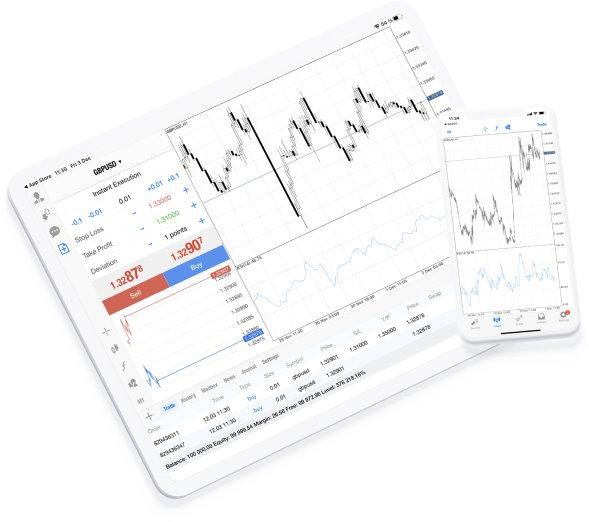
One of the best trading platforms today is MT4 and it is available on computer and on mobile. Despite this, there are differences between the two versions which you should be aware of. We explain them in detail, so you can have a better understanding.
- The MT4 for PC version is more suitable for advanced technical analysis thanks to the larger screen size. Given the difference in screen size, most professional traders use MT4 on a desktop or laptop when they want to analyze market moves. Even though the same tools exist on the mobile app, the screen size limits your visibility and ability to see larger themes in the market. This is especially true for traders who rely on technical analysis extensively in their trading.
- The strategy automation feature exists only on the desktop app. If you use automated strategies, then MT4 for PC is the platform of choice for you. The strategy testing and execution tool is only available on the desktop version of the app, given that it requires processing power (and probably a larger screen size).
- Custom indicators are available only on the desktop app as well. If you use custom indicators in your trading, then using the desktop version of MT4 is essential, as the mobile version does not display those indicators. This is yet another reason to use the desktop version if technical signs are your preferred methods of studying the market.
- The MT4 mobile version is suitable for trading on the go. If you rely on fundamental analysis in your trading, then MT4 on mobile is a great and intuitive platform to use. In addition, if you travel a lot, then MT4 on the mobile helps you open positions, monitor them, and close them whenever and wherever you want. Despite this, you should not babysit your positions and monitor them all the time. It is recommended to switch off every now and then to reduce your stress levels.
- The trailing stop loss feature is only available on the desktop version of MT4. If you are a short-term trader and want to take advantage of quick moves, then you might need to use a trailing stop loss. This feature only exists on the desktop version of MT4, as the mobile app has the stop loss order without the trailing feature.
Summary
In short, the MT desktop app is suitable for all purposes, whereas the mobile version helps traders who have a dynamic lifestyle and need to monitor their traders while on the move. That is, the two versions complement one another and give you the best experience when combined togethe

-
Product on sale AWEBook Volume 2Original price was: KShs 3,500.00.KShs 3,000.00Current price is: KShs 3,000.00.